FreshFolio is a food waste tracker built into a pantry inventory app for iPhone and Android. Every time food is used or thrown out, FreshFolio records it with its value, so Reports & Insights can show how much you used, how much you wasted, which items you throw away most, and why.
How food waste tracking works
- Record what you paid. Enter a price when you put groceries away, and FreshFolio can put a value on everything you use and everything you waste.
- Dispose with a reason. When food goes bad, dispose of that lot and pick a reason: Expired, Spoiled, Missing, or Other. Swipe right on a lot in Item Details, or long-press items in the pantry list to dispose of several at once.
- Open Reports. From the ⋮ menu, open Reports and choose Month-to-Date, Year-to-Date, or Last Year.
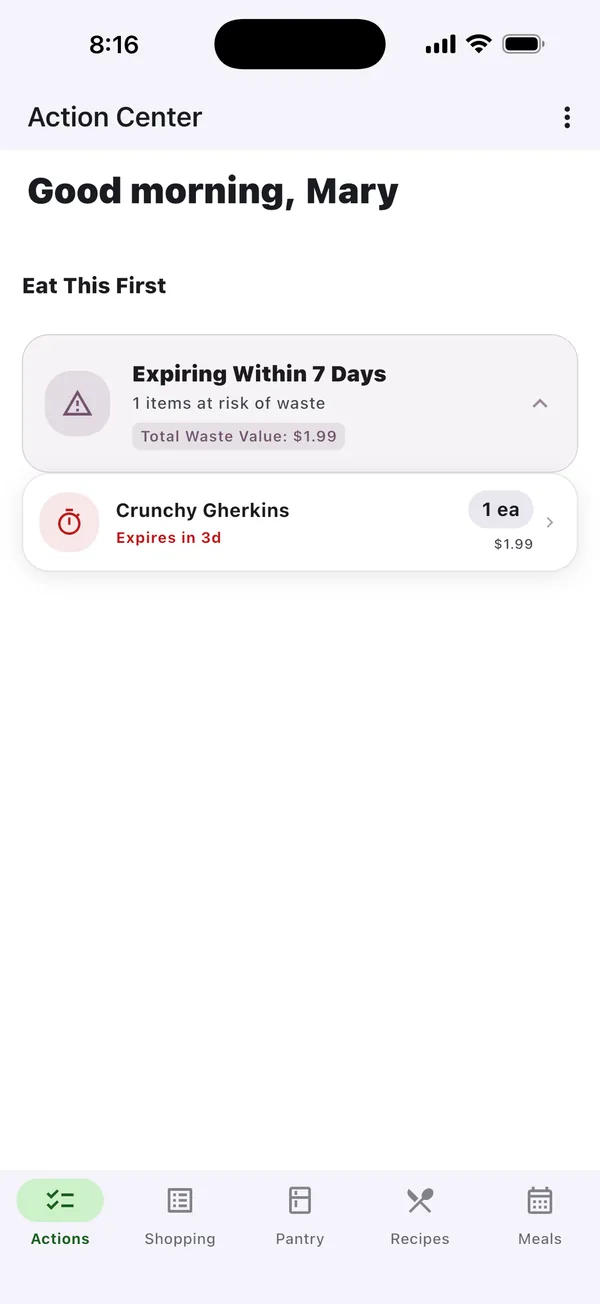
See what's at risk before it's wasted
The Action Center shows what expires within 7 days and the value at risk, so you can use it before it becomes waste.
- Items expiring within the next 7 days
- The value of the food at risk
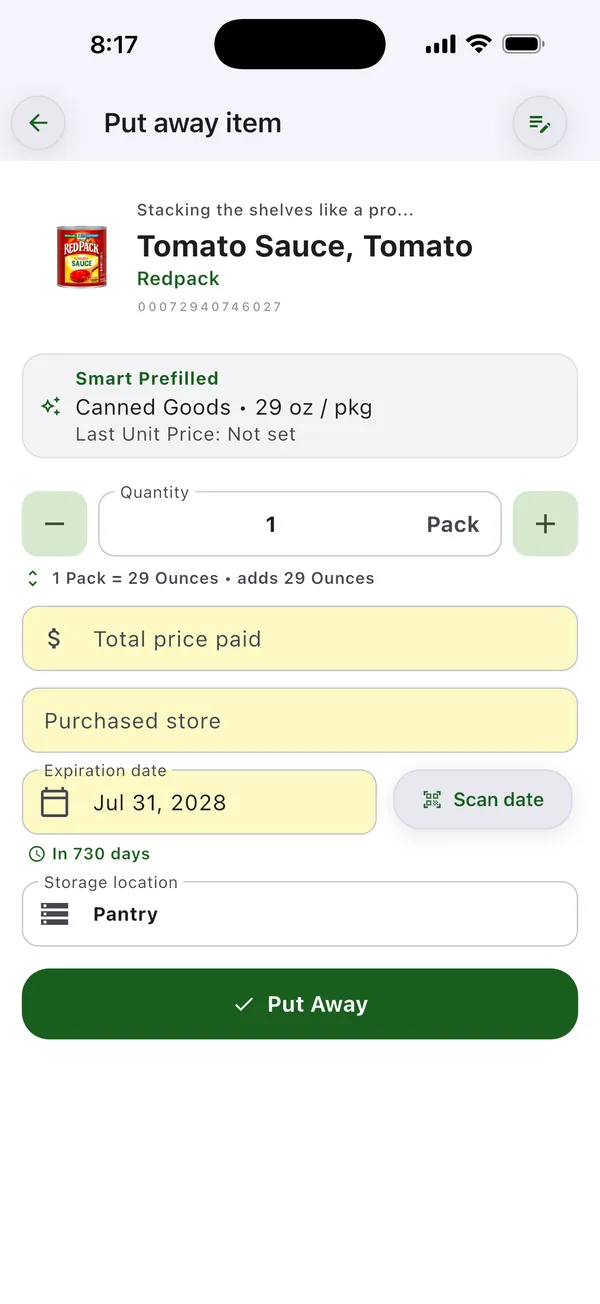
Prices make waste visible
Enter what you paid when you put groceries away, and every disposal is valued at that price in your reports.
- Total price paid and store, recorded at Put Away
- Waste is measured in money, not guesses
What the waste reports show
- Four KPI cards: current inventory value, consumed value, waste value with a change-since-last-period chip, and efficiency (the share of food used rather than wasted).
- Consumed vs Wasted trend: a line chart of the value of what you used and what you wasted, by week or month.
- Top Wasted Items: the items you throw away most, ranked by the money wasted.
- Waste Reason Breakdown: how much was expired, spoiled, missing, or other.
Then waste less
Knowing what you throw away is half of it. FreshFolio also alerts you 3, 5, or 7 days before food expires, shows saved recipes you can cook right now in What Can I Cook?, and on Pro and the free trial can build a recipe around what's expiring. Ask the Pantry Assistant "how much food did we waste?" for your last 30 days. Pantry owners also get a Weekly Pantry Summary email every Monday listing items that expire in the next 7 days.
Which plan includes this? Reports & Insights is included on Standard, Pro, and the 30-day free trial, no credit card required. The lighter summary on the Action Center tab stays available on every plan. Compare plans →
Food waste tracking at a glance
| Waste reasons | Expired, Spoiled, Missing, or Other |
|---|---|
| Timeframes | Month-to-Date, Year-to-Date, or Last Year |
| Reports | Inventory, consumed, and waste value, efficiency, a spend-vs-waste trend, and Top Wasted Items |
| Values | Based on the price you paid at Put Away |
| Mistakes | Reverse a disposal from Activity History to restore the item |
| Plans | Standard, Pro, and the 30-day free trial; the Action Center summary on every plan |
Frequently asked questions
How does FreshFolio measure food waste?
From disposals. When you dispose of a lot, you pick a reason (Expired, Spoiled, Missing, or Other) and FreshFolio records it with an estimated loss value based on what you paid. Reports & Insights totals those disposals against what you used.
Can I see which foods I waste most?
Yes. Top Wasted Items in Reports & Insights ranks the items you dispose of most, sorted by the money wasted, and the Waste Reason Breakdown shows whether waste is mostly expired, spoiled, or missing food.
What if I recorded a disposal by mistake?
Open Activity History from Reports and reverse the transaction. Reversing restores the item to your pantry, and the original stays in your history marked Reversed.
Which plan includes food waste reports?
Reports & Insights, including the spend-versus-waste trend and Top Wasted Items, is included on Standard, Pro, and the 30-day free trial. The Action Center summary is available on every plan.
Read the full Reports & Insights guide →